To avoid shadows and glare during videoconferencing, place your main light in front or slightly to the side at eye level, using diffusers or softboxes to soften the glow. Keep the light at a neutral white color (5000K-6500K) for natural skin tones. Avoid positioning lights directly behind you to prevent glare and silhouettes. Regularly check your camera feed and make small adjustments to improve illumination, so your setup stays professional and engaging—more tips to perfect your lighting await.
Key Takeaways
- Position lights in front of you at eye level to evenly illuminate your face and minimize shadows.
- Use diffusers or softboxes to soften light and reduce harsh shadows and glare.
- Select neutral white light (5000K-6500K) to create a natural, balanced appearance.
- Avoid placing lights directly behind you to prevent back glare and silhouettes.
- Regularly adjust and check lighting via your camera feed for optimal shadow and glare prevention.
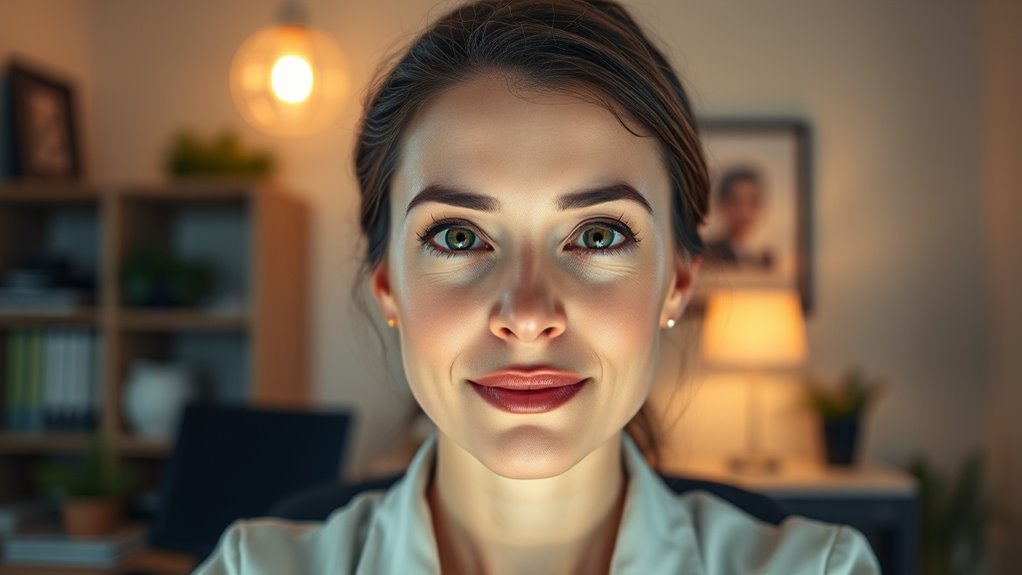
Have you ever noticed how poor lighting can make your videoconferences look unprofessional or unengaging? The right lighting setup isn’t just about brightness; it’s about creating a balanced environment that enhances your image and makes communication smoother. Ambient illumination plays a essential role here. Instead of relying solely on a harsh overhead light or a single lamp, aim for soft, diffused light that fills the room evenly. This kind of ambient illumination reduces harsh shadows and prevents your face from appearing overly dark or washed out. When your space is evenly lit, your viewers can see your expressions clearly, making your communication more effective. Additionally, Ambient illumination can help foster a welcoming atmosphere, which supports better connection and engagement during your calls.
Balanced ambient lighting ensures clear expressions and a professional look in videoconferences.
Color temperature is another indispensable factor you shouldn’t overlook. It refers to the warmth or coolness of the light, measured in Kelvins. If your lighting is too warm (yellowish), it can give you an unflattering, overly cozy appearance. Too cold (bluish), and it might make you seem distant or unapproachable. Ideally, you want a neutral white light—around 5000K to 6500K—that closely mimics natural daylight. This creates a natural look, ensuring your skin tone appears accurate and your surroundings are neither too warm nor too clinical. Adjusting the color temperature to match your environment helps maintain a professional appearance while avoiding distracting color casts.
When setting up your lighting, consider the placement of your light sources. Avoid positioning lights directly behind you, which can cause glare or make you appear as a silhouette. Instead, place your main light source in front or slightly to the side, at eye level or slightly above. This helps illuminate your face evenly and minimizes shadows that can obscure your features. Additionally, using diffusers or softboxes can help spread light more evenly and reduce harsh shadows. You might also add a secondary, softer light on the other side of your face to fill in shadows and create a more balanced look.
Adjusting ambient illumination and color temperature isn’t a one-time task; it’s an ongoing process. Regularly check your camera feed to see how your lighting setup looks to others. Small tweaks, like changing the position of your light or adjusting the warmth of your bulbs, can make a significant difference. Good lighting enhances your presence on screen, making your videoconferences more professional, engaging, and comfortable for everyone involved.

Cyezcor Video Conference Lighting Kit, Ring Light for Monitor Clip On,for Remote Working, Distance Learning,Zoom Call, Self Broadcasting and Live Streaming, Computer Laptop Video Conferencing
【ADJUSTABLE TEMPERATURE AND BRIGHTNESS】Our video conference lights have 3 color temperatures (white light/warm light/natural light) which are 3200k-6800k,…
As an affiliate, we earn on qualifying purchases.
As an affiliate, we earn on qualifying purchases.
Frequently Asked Questions
How Can I Prevent My Face From Appearing Washed Out?
To prevent your face from appearing washed out, start by adjusting your camera settings to enhance contrast and brightness subtly. Use natural or soft lighting, avoiding overly bright lights that wash out your features. Applying light face makeup can add warmth and definition. Position your light source at eye level and slightly in front of you to create a balanced, natural look, reducing glare and shadows for a clearer, more vibrant appearance.
What Color Temperature Is Best for Videoconferencing Lighting?
You should choose a color temperature around 4000K to 5000K for videoconferencing lighting. This range provides neutral, natural-looking light that reduces shadows and glare, making your face appear clear and professional. Avoid overly warm lighting, which can make you look yellow or washed out. Warm lighting, around 3000K, creates a cozy feel but might not be as accurate for video. Stick to 4000K-5000K for the best results.
How Do I Eliminate Reflections on Glasses During Calls?
To eliminate reflections on glasses during calls, focus on glare reduction and reflection control. Position your light source at a 45-degree angle from your face, avoiding direct light hitting your glasses. Use diffused lighting or softboxes to minimize harsh reflections. Adjust your monitor or camera angle slightly downward, and consider anti-reflective coatings on your glasses. These steps help create a clearer, glare-free image, making your video calls more professional and comfortable.
Can Natural Light Be Effectively Used for Video Calls?
Natural light can be your secret weapon for video calls, but it’s like a double-edged sword. Position your window wisely—preferably in front or to the side—to avoid harsh shadows or glare. Use sheer curtains to soften the light, making your face evenly lit. When you master window placement, natural light will brighten your face without washing out your image, creating a welcoming, professional appearance that feels natural and inviting.
What Lighting Setups Are Recommended for Small Rooms?
For small rooms, you should use desk lamps and adjustable fixtures to create even lighting. Position a desk lamp behind your camera at eye level to illuminate your face without causing glare. Use adjustable fixtures to control brightness and avoid shadows. Combining natural light with these options helps guarantee your face is well-lit, making your video calls clearer and more professional. Keep the lighting soft, avoiding harsh shadows or glare.

NEEWER 700W Equivalent Softbox Lighting Kit, 2Pack UL Certified 5700K LED Lighting Bulbs, 24×24 inches Softboxes with E26 Socket, Photography Continuous Lighting Kit Photo Studio Equipment
The kit includes (2) 24"X24"/60x60cm Softbox + (2) 35W 5700K LED Light Bulb (total equivalent to 700W regular…
As an affiliate, we earn on qualifying purchases.
As an affiliate, we earn on qualifying purchases.
Conclusion
Think of your lighting setup as the stage for your digital performance. When you avoid shadows and glare, you create a clear, inviting spotlight on you—like a well-lit path guiding your audience straight to your message. Remember, good lighting isn’t just about visibility; it’s about making your presence feel genuine and professional. With the right setup, you’ll turn your videoconferences into a seamless, compelling experience that leaves a lasting impression—no spotlight required.

Pzloz Led Desk Lamp for Office Home – Eye Caring Architect lamp with Clamp,Dual Screen Computer Monitor Work Smart Light: 24W 5 Color Flexible Adjustable Lighting Table Lamp for Study Drafting
Versatile Lighting Options: This LED desk lamp offers 25 light combination modes with 5 color temperatures (3000K-5500K) and…
As an affiliate, we earn on qualifying purchases.
As an affiliate, we earn on qualifying purchases.

Neewer 18 inches Collapsible Photography Video Light Softbox Diffuser for 75W(600W Equivalent) Ring Fluorescent Light Flash Light
Beauty dish-like design for a soft and even illumination as well as circular reflections
As an affiliate, we earn on qualifying purchases.
As an affiliate, we earn on qualifying purchases.