TL;DR

Get furniture and decor delivered free — and shop member deals
- Fast, free delivery on millions of items
- Access to Prime Big Deal Days deals on October 6–7
- Prime Video, Amazon Music and more included
Building your own AI workstation used to be cheaper, but today prebuilt systems often come close or beat DIY on price, while saving you time and offering validated thermals and warranties. The right choice depends on your budget, skills, and timeline.
Imagine you’re ready to jump into AI development. You’ve got the skills and the ideas, but your hardware? That’s a whole different story. Building a machine from scratch or buying a ready-made system — it’s not just a choice, it’s a game changer.
Back in the day, building was a no-brainer for saving money. Now? The landscape has flipped. Component prices have soared, and prebuilt vendors have locked in bulk discounts, making their systems surprisingly competitive or even cheaper. This guide cuts through the hype, showing you exactly when to build, when to buy, and what really matters for your AI workloads.
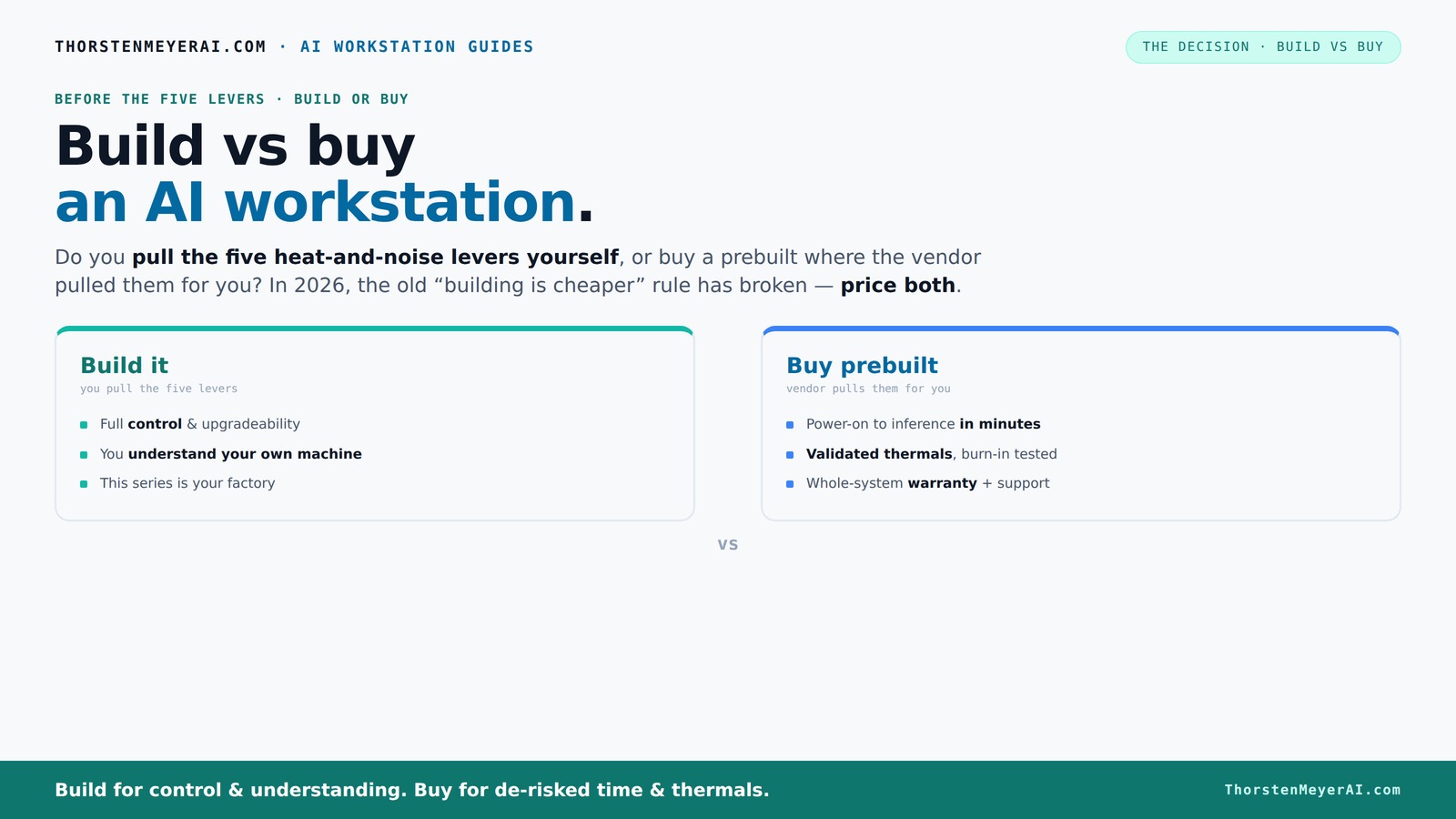
Build vs buy
an AI workstation.
The real question behind this whole series: do you pull the five heat-and-noise levers yourself, or buy a prebuilt where the vendor pulled them for you? And in 2026, the old “building is cheaper” rule has broken. Match your situation in Part 3.
Key Takeaways
- Component shortages in 2026 have made prebuilt AI workstations often more cost-effective than DIY, especially when factoring in time and support.
- Prebuilts offer validated thermals, warranties, and faster deployment — ideal for professionals who need to start working immediately.
- For maximum customization and control, building your own rig still makes sense if you enjoy tuning and troubleshooting, and can manage the upfront costs.
- GPU VRAM and thermal management are the most critical specs for AI workloads, often more than CPU or storage.
- Local hardware becomes more economical than cloud rentals after 6–12 months of regular AI training, depending on workload and hardware costs.
As an affiliate, we earn on qualifying purchases.
Why Building a Custom AI Workstation Might Cost You More Than You Think
Building your own AI rig isn’t just about buying parts. It’s about hours of sourcing, testing, troubleshooting, and tuning. And in 2026, those costs have gone up. Component shortages mean you might pay a premium for GPUs, RAM, and SSDs — sometimes 20-30% more than two years ago.
For example, a DIY build that used to cost around $1,200 now easily hits $1,500 or more. But beyond the sticker price, consider the implications: each component requires compatibility checks, firmware updates, and thermal solutions. If you select incompatible parts or misconfigure cooling, you risk thermal throttling, reduced lifespan, or outright hardware failure, which can lead to costly delays.
Furthermore, troubleshooting and tuning can extend your setup time significantly. If your goal is to get productive quickly, these hidden costs—both in time and potential hardware issues—can outweigh the savings. The tradeoff is clear: DIY can be cheaper upfront, but the complexity and potential for costly mistakes grow with component scarcity and the need for expert tuning.
Prebuilt AI Workstations: The Fast Track to Productivity
Prebuilt systems aren’t just assembled parts; they’re ready-to-run machines tuned for AI workloads. Vendors like Lambda, Puget, and BIZON test their systems under sustained load, optimize thermals, and validate stability before shipping. This rigorous quality assurance ensures that your system performs reliably from day one, saving you from the guesswork and trial-and-error involved in DIY setups.
Imagine unboxing a system that already has CUDA, TensorFlow, and other tools installed. You power it on, and in minutes, you’re training models instead of troubleshooting hardware issues. The advantage here isn’t just convenience; it’s also the peace of mind that comes with manufacturer support, warranties, and guaranteed performance. These systems are designed with specific workloads in mind, so you avoid the compromises and thermal issues often seen in DIY builds.
For example, BIZON advertises systems with up to 30% lower noise and temperature, thanks to factory tuning. This not only creates a more comfortable working environment but also extends hardware lifespan. Such reliability is especially critical for professionals who depend on consistent uptime, as it minimizes downtime and costly repairs. The tradeoff? You pay a premium, but you gain stability, speed to deployment, and ongoing support—crucial factors for many AI practitioners.
Hardware Choices That Matter Most for AI Performance
When it comes to AI, certain hardware choices punch above the rest. The GPU is king, especially VRAM and CUDA cores. For large models, 24GB or more VRAM can be the difference between training in hours or days. Think of the GPU as the engine; the more powerful it is, the faster your work. But it’s not just raw power—efficient thermal management and stability are essential to maintain peak performance over long training sessions, which is why quality cooling and firmware optimization matter.
Next comes RAM. For most AI tasks, 64GB of DDR5 RAM is becoming standard, providing enough headroom for datasets and multitasking. Insufficient RAM can bottleneck data loading and preprocessing, causing delays and inefficiencies. CPU? While important, it usually takes a backseat to GPU performance in deep learning, but a balanced system prevents bottlenecks and ensures smooth operation.
Storage matters too — NVMe SSDs for fast data loading, especially if your datasets are gigabytes or terabytes. High-speed storage reduces training and data preprocessing times. The key is balancing these components within your budget and thermal limits to avoid bottlenecks, ensuring your system is optimized for the specific demands of your AI projects.
Frequently Asked Questions
Is it cheaper to build or buy a prebuilt AI workstation?
It used to be that building your own was always cheaper, but in 2026, component shortages and bulk discounts mean prebuilts often match or beat DIY prices. Always compare the exact configuration and consider support costs.
What hidden costs come with building my own AI workstation?
Hidden costs include troubleshooting compatibility issues, thermal tuning, time spent sourcing parts, and potential warranty gaps. These can add up quickly compared to the flat support and warranty from a prebuilt vendor.
How much value do I get from a warranty and support?
Warranties cover hardware failures during intensive AI workloads, which can be costly without support. Prebuilt vendors often include multi-year support, reducing downtime and troubleshooting stress.
Can a prebuilt system match the performance of a custom build?
Yes. Many prebuilt systems are now optimized for AI workloads, with high-end GPUs and validated thermals. They often match or even surpass custom builds in stability and cooling.
When does local hardware beat cloud GPU rental on cost?
If you run AI models regularly, owning hardware pays off within 6–12 months, considering rental fees, data transfer costs, and electricity. For infrequent use, cloud remains more flexible.
Conclusion
Deciding to build or buy isn’t just about saving dollars. It’s about your timeline, your expertise, and how much control you want over your AI environment. In 2026, the smarter move often isn’t the cheapest — it’s the one that gets you working faster and more reliably.
So, ask yourself: are you ready to tune every cooling fan and tweak every component? Or do you want a machine that’s ready to go, with support behind it? Either way, your AI journey starts with making the right choice today.
Fall Picks
fall essentials
As an affiliate, we earn on qualifying purchases.