
Choosing smart home automation devices is less about buying a particular bulb or sensor and more about deciding how your devices will work together. Hub-based systems use a central controller to link compatible products and run routines across them. Wi-Fi devices connect directly to your router, often with setup and control handled by a manufacturer’s app. Those approaches can overlap: some hubs support Wi-Fi devices, and some products work across more than one ecosystem. The distinction is still useful when deciding what kind of setup to build.

Get furniture and decor delivered free with Prime
- Fast, free delivery on millions of items
- Prime Video, Amazon Music and more included
- Member-only deals all year

Echo Hub (8") – Redesigned with Customizable Control and Alexa+
- ✔ Display: 8-inch touchscreen, 1280 × 800
- ✔ Connectivity: Wi-Fi, Bluetooth LE Mesh, Zigbee, Thread, Matter, Amazon Sidewalk
- ✔ Power: USB-C PD; optional PoE+ or PoE++

Aqara Smart Home Hub M3 for Advanced Automation, Matter Controller, IR
- ✔ Model: HM-G01E
- ✔ Connectivity: Zigbee, Thread, dual-band Wi-Fi, Bluetooth, USB-C, PoE
- ✔ Aqara Zigbee capacity: Up to 127 Aqara Zigbee devices
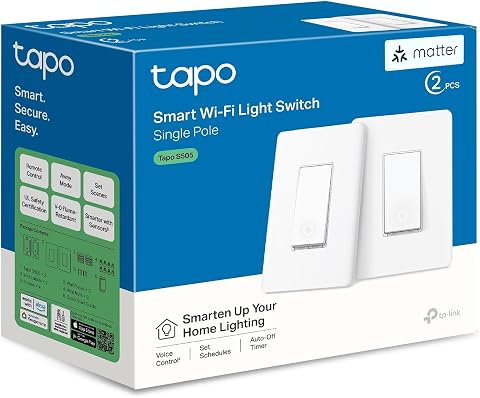
TP-Link Tapo S505 Matter Smart Light Switch, 2-Pack
- ✔ Quantity: 2-pack
- ✔ Switch type: Single-pole, one-way
- ✔ Connectivity: Matter and Wi-Fi
Hub-based devices are usually a better fit for someone who wants coordinated routines, plans to add sensors and controls over time, or values local operation when internet access is interrupted. Wi-Fi devices make more sense for a smaller setup where quick installation, low starting cost, and app control matter most. The practical tradeoff is convenience now versus coordination and flexibility as the system grows. The sections below compare both approaches across setup, automation, reliability, compatibility, privacy, and value.
At a Glance
| Criteria | Hub-based smart home devices | Wi-Fi smart home devices | Winner |
|---|---|---|---|
| Setup and daily control | Requires choosing and configuring a hub; one controller can bring compatible devices into shared routines. | Often quick to install and control through a brand app; every product may have its own setup and interface. | B |
| Automation depth | Often supports routines that link sensors, switches, lights, and other devices, including local rules on some systems. | Commonly handles schedules and basic scenes well; cross-brand or sensor-led routines can be less consistent. | A |
| Reliability and internet dependence | Can keep supported local automations running during an internet outage; hub and network still need power. | Usually depends on Wi-Fi and may depend on a cloud service for remote access or some functions. | A |
| Compatibility and expansion | Can offer broad device support, but compatibility depends on the hub, protocols, and product support. | Easy to add products that use Wi-Fi, but router capacity, apps, and brand ecosystems can limit a growing setup. | A |
| Privacy and data handling | Local processing can reduce reliance on cloud services, though app, voice, and remote features may still send data online. | Privacy depends on each manufacturer’s app, account, cloud service, and settings. | Depends |
| Cost and value | Higher initial cost and setup effort can pay off in a larger, coordinated system. | Low entry cost makes a few connected devices affordable; many devices can add app and network overhead. | Depends |
Echo Hub (8") – Redesigned with Customizable Control and Alexa+
The Echo Hub is the strongest all-around choice when automation means bringing many devices together and making them easy to reach. Its 8-inch touch display gives household members a visible dashboard for controls, cameras, and routines, while customizable and resizable controls let the main screen reflect the way a home is actually used. That is a meaningful advantage over the Aqara M3, which puts its emphasis on hub functions and local automation rather than serving as a full touch control panel.Its case for broad compatibility is equally strong: the Hub supports Zigbee, Thread, Matter, Wi-Fi, Bluetooth LE Mesh, and Amazon Sidewalk. That mix can reduce the need to build automation around only one connection type. It does not mean every accessory will work in every way, however; buyers still need to check specific device and Alexa compatibility. Compared with the Tapo S505 pair, the Echo Hub can serve as a central interface across device categories rather than automate only compatible lighting circuits.Installation shapes whether this is the right pick. The Hub can be wall-mounted, and optional PoE or cable pass-through can help create a tidy permanent setup, but those accessories are not included as standard power solutions. The included USB-C adapter is simpler, though a visible cable may be less suited to a polished hallway installation. This is a fixed household panel, not a portable controller, and some Bluetooth profiles are unsupported. Privacy controls include a microphone-off button, and the unit uses recycled materials, but buyers who prefer a hub with no microphone or camera may favor the Aqara M3’s simpler privacy profile.
Pros:
- Customizable 8-inch dashboard keeps frequently used device controls and routines easy to reach.
- Supports Zigbee, Thread, Matter, Wi-Fi, Bluetooth LE Mesh, and Sidewalk.
- Can be wall-mounted, with optional PoE and cable pass-through installation approaches.
- Includes a microphone-off control and uses 27% recycled materials.
Cons:
- PoE and in-wall cable pass-through require separate accessories.
- Fixed placement and some unsupported Bluetooth profiles limit flexibility.
Best for: Households with a mix of Alexa-compatible smart devices that want a shared, visible dashboard for controls, cameras, and routines.
Not ideal for: Buyers who want a portable screen, a microphone-free hub, or a clean PoE installation without sourcing additional accessories.
Bottom line: Choose the Echo Hub when a broad device mix and a shared touch dashboard matter more than portability or a microphone-free design.
“Choose the Echo Hub when a broad device mix and a shared touch dashboard matter more than portability or a microphone-free design.”
Aqara Smart Home Hub M3 for Advanced Automation, Matter Controller, IR
The Aqara Hub M3 suits buyers who want automation to keep working close to home, especially when their devices already come from Aqara. Its local Edge automation can reduce dependence on cloud services for supported routines, and its 8 GB of end-to-end encrypted storage provides local capacity for its privacy-focused design. Unlike the Echo Hub, the M3 has no microphone or camera; it is a hub to build around, not a screen where the family browses controls.For compatible homes, its mix of Zigbee, Thread, Wi-Fi, Bluetooth, USB-C, and PoE gives it several ways to connect and install. Aqara specifies capacity for up to 127 Aqara Zigbee devices and up to 127 Thread devices, with repeaters required for Thread. It also acts as a Matter bridge. Those headline capacities are most relevant when the device mix fits the ecosystem: third-party Zigbee products are not supported, making the M3 less open in practice than the Echo Hub’s broader advertised protocol list.The standout extra is its 360-degree smart IR blaster with status feedback, which can control compatible air-conditioning equipment and expose it through Matter. That gives the M3 a kind of appliance reach neither the Echo Hub nor Tapo switch provides on its own. The limitation is specific: only one AC device can be exposed to Matter at a time. Choose it over the Echo Hub when local automation and Aqara accessories are the priority; skip it if your Zigbee devices come from several brands or you want a large on-device dashboard.
Pros:
- Local Edge automation can reduce reliance on cloud services for supported routines.
- Bridges Matter and supports Aqara Zigbee and Thread devices, with Thread repeaters required.
- 360-degree IR control with feedback adds compatible AC units to automation possibilities.
- No microphone or camera; includes 8 GB encrypted local storage.
Cons:
- Zigbee compatibility is limited to Aqara devices, excluding third-party Zigbee products.
- Only one AC device can be exposed to Matter at a time.
Best for: Aqara households that want local automation, Matter bridging, and IR control for a compatible air conditioner in a hub without microphones or cameras.
Not ideal for: People building around mixed-brand Zigbee accessories or needing to expose several AC units through Matter.
Bottom line: The M3 is the better specialist hub for an Aqara home that values local routines and IR appliance control over brand-neutral Zigbee support.
“The M3 is the better specialist hub for an Aqara home that values local routines and IR appliance control over brand-neutral Zigbee support.”
TP-Link Tapo S505 Matter Smart Light Switch, 2-Pack
The Tapo S505 is the most focused recommendation in this lineup: it automates lights at the wall, rather than trying to act as a central home hub. Each Matter-certified, single-pole switch can be controlled by app, touch, or voice and supports scheduling and timers. Its two-switch package is useful when the first automation project is a pair of ordinary light circuits. The Echo Hub can provide a richer home-wide control interface, but it cannot replace the need for compatible switches when the goal is to automate fixed lighting.Platform flexibility is the S505’s main advantage. It works with Apple Home, Amazon Alexa, Google Home, and Samsung SmartThings, with Matter Multi-Admin allowing compatible platforms to manage the device. Local network control can continue when internet service is unavailable, which makes everyday light operation less dependent on a cloud connection. Compared with the Aqara M3, the S505 has no broad sensor or accessory hub role; it is a direct way to make lighting automation part of whichever compatible platform the household already uses.Installation is the deciding constraint. The switch requires a neutral wire, 2.4 GHz Wi-Fi, and a single-pole circuit, so it is not suitable for every wall box or multi-location lighting arrangement. Buyers should confirm the wiring before planning a project. If the wiring fits, the app-guided setup, timers, and voice control make this a straightforward entry point. If it does not, the hubs are more relevant for compatible plug-in or wireless accessories, though they will not solve the S505’s wiring requirement.
Pros:
- Matter support spans Apple Home, Alexa, Google Home, and SmartThings.
- Local LAN control can continue without internet access.
- App, touch, voice, scheduling, and timer controls cover common lighting routines.
- Two switches make it possible to automate more than one compatible circuit.
Cons:
- Requires a neutral wire and 2.4 GHz Wi-Fi.
- Designed for single-pole installations, limiting fit for multi-way circuits.
Best for: Homeowners or renovators with neutral-wire, single-pole circuits who want Matter lighting control across their preferred smart home platform.
Not ideal for: Homes with no neutral wire, multi-way switching needs, or buyers seeking one device to coordinate many types of accessories.
Bottom line: Pick the Tapo pair for affordable-in-scope, platform-flexible lighting automation when your wiring matches its single-pole requirements.
“Pick the Tapo pair for affordable-in-scope, platform-flexible lighting automation when your wiring matches its single-pole requirements.”
As an Amazon Associate we earn from qualifying purchases.
Key Differences
The clearest difference appears when a home has to respond to more than one device. A Wi-Fi bulb can turn on at a scheduled time, and a smart plug can be switched from its app. A hub-based system can also connect a motion sensor, a door contact, and a light so that one event triggers a sequence. That shared control is valuable when routines should adapt to what is happening at home. For someone who only wants to switch a few lights remotely, the extra controller may bring little benefit.
Reliability and compatibility are not guaranteed by either label. A hub can run supported automations locally, but remote control or voice features may still rely on the internet, and the hub itself needs power. Wi-Fi products avoid a separate hub, but a crowded or poorly covered network can cause trouble, and cloud-dependent features may stop working during an outage. Before buying, check the exact device’s supported platforms, protocols, local features, and requirements. A product marked compatible with a platform may still have limited functions there.
The value decision follows the same pattern. Wi-Fi is usually the cheaper way to start, especially if the goal is a couple of lights, plugs, or cameras. Hub-based control asks for more upfront planning and often another device to buy, but can reduce the friction of managing a larger collection. Pay more for a hub when its supported automations or device connections solve a real need. If your routines are simple and app control is acceptable, a hub is unlikely to be a worthwhile upgrade.
Detailed Comparison
Setup and daily control (Wi-Fi smart home devices wins — moderate)
Wi-Fi devices win for a quick start: many connect directly to a router and are configured in a brand app, without a separate controller. The gap is moderate for a small home setup, where adding a few devices is straightforward. Hub-based systems take more planning because you need to select a compatible controller and pair supported products with it. In exchange, a single app or interface may bring many devices together. Choose Wi-Fi if you prize a fast first install; choose a hub if central control will make a larger system easier to live with.
Automation depth (Hub-based smart home devices wins — major)
Hub-based systems usually win when automations need to link several types of device. A sensor can trigger a light, a switch can change a scene, and a schedule can interact with other supported products. The gap is major for sensor-led, multi-step routines, though the precise options vary by platform. Wi-Fi devices commonly offer schedules and simple scenes, which are enough for many homes, but separate apps and cloud rules can make complex cross-brand behavior harder to manage. If you only need timers or remote switching, Wi-Fi’s simpler approach may be all the automation you need.
Reliability and internet dependence (Hub-based smart home devices wins — moderate)
Hub-based devices have an advantage when the hub can run automations locally: supported routines may continue through an internet outage. This is a moderate advantage, not a blanket promise. The hub, router, and devices still need power, and remote access or voice control may still need an internet connection. Many Wi-Fi devices also rely on a manufacturer’s cloud for some controls or integrations, though behavior differs by product. Check whether a specific device supports local control and what still works offline before treating either design as outage-proof.
Compatibility and expansion (Hub-based smart home devices wins — moderate)
Hub-based systems have a moderate advantage when the controller supports the device types and standards you want to combine. A compatible hub can give one system a path to lights, sensors, locks, and other products without requiring each to use the same brand. But hub labels do not guarantee universal support: verify each model and feature, and check whether the hub depends on a specific protocol. Wi-Fi devices are easy to add when they fit your existing network and app ecosystem. They can become cumbersome as brands, apps, and network demands multiply.
Privacy and data handling (moderate difference)
Neither approach wins in every case. Hub-based control can reduce cloud dependence when automations run locally, giving it an advantage for users who want fewer tasks sent to a service provider. That advantage is minor to moderate and depends on the exact setup: remote access, voice assistants, and some integrations may still process data online. Wi-Fi devices vary widely by manufacturer and can send usage or device data through apps and cloud services. Compare privacy policies and account requirements for the actual products; a hub alone does not make a setup private.
Cost and value (moderate difference)
Wi-Fi devices usually win on the cost of entry because there is no hub to buy and many products can be added one at a time. The gap is minor for a small setup, but it may narrow as the number of apps, services, and devices grows. A hub adds an upfront expense and setup work. Its value improves when it replaces separate controls with useful shared automations or lets compatible devices work together. Buy the hub for functions you will use; do not pay extra merely in the hope that a central controller will make every product compatible.
Hub-based smart home devices: Pros and Cons
Pros:
- Can coordinate supported devices from different categories in shared routines.
- May run supported automations locally during an internet outage.
- Can provide a clearer route to expand into sensors and more advanced routines.
Cons:
- Adds the price and setup of a controller.
- Compatibility varies by hub, protocol, product, and feature.
- Some remote, voice, or integrated features still depend on internet services.
Wi-Fi smart home devices: Pros and Cons
Pros:
- Often quick to install without buying a separate controller.
- Low starting cost for a few lights, plugs, or other connected devices.
- Simple app control and schedules can cover everyday needs.
Cons:
- Several products may mean several apps or accounts.
- Complex routines across brands can be harder to build and maintain.
- Network performance and cloud reliance can affect features, depending on the product.
Who Should Choose What
Choose Hub-based smart home devices if:
- You want sensors and devices to trigger coordinated routines across rooms.
- You expect to expand the system and have confirmed the hub supports the products you plan to use.
- Local operation during internet outages is valuable, and the specific hub and devices support the routines you need.
Choose Wi-Fi smart home devices if:
- You want to control a small number of devices from a phone with minimal setup.
- Your routines are mostly schedules, scenes, and remote on/off control.
- Avoiding the upfront cost of a hub matters more than having one central system.
Skip both if: Skip connected devices if you do not need remote control or automation, or if your Wi-Fi coverage and account security are not ready for additional devices.
Value for Money
Wi-Fi devices tend to be better value at the beginning: you can buy one or two products, use their apps, and avoid paying for a controller before you know what you need. That is a sensible choice when the goal is modest, such as setting a lamp schedule or switching a plug remotely. The lower entry price loses some of its appeal if every new product adds another app, account, or cloud service that you have to manage.
A hub is worth paying for when its real features matter to your home. If it can connect the sensor and light you want, run a useful routine locally, and support the products you expect to add, the upfront expense can buy a more coherent system. It is poor value if you only want basic app control or if your chosen products do not work with it. Compare the hub price with the combined cost of the compatible devices and any subscriptions you actually need; do not assume that either approach is automatically cheaper over time.
Final Verdict
For most people starting with a few smart home devices, Wi-Fi is the more practical first purchase: it costs less to try, installs quickly, and handles basic schedules and remote control. Choose hub-based devices when you have a specific need for routines that link sensors and devices, expect to build a broader system, or have verified that local automation works for your setup. The deciding factor is how much coordination you need. A hub earns its cost when it makes devices act together in ways the separate apps cannot; otherwise, Wi-Fi is the better value.
Frequently Asked Questions
Do hub-based smart home devices need an internet connection?
Some supported devices and routines can operate locally through a hub without internet access, but offline behavior varies. Remote control, voice assistants, cloud integrations, and app features may still need internet service. Check the hub and device specifications for the exact functions that keep working offline.
Are Wi-Fi smart home devices a bad choice for a large setup?
Not necessarily. A large Wi-Fi setup can work if the router, coverage, apps, and chosen products suit it. The tradeoff is that devices may depend on different apps or cloud services, and a busy network can become harder to manage. A hub can help centralize compatible devices, but it is not a guarantee of universal support.
Can hub-based and Wi-Fi devices work together?
Often, but only when the hub and each device support the same platform, integration, or connection method. Some Wi-Fi products can be added to a hub’s app, while others remain controlled by their own app. Confirm the specific models and the functions available through the hub before buying.
Is a smart home hub worth the extra cost?
It is worth paying for when you will use its supported cross-device routines, local automation, or centralized control. If you mainly want a few lights or plugs on schedules, direct Wi-Fi devices are usually the better value. Base the decision on the devices and automations you plan to use rather than the possibility of future features.